ANALYSIS: IP Inventory
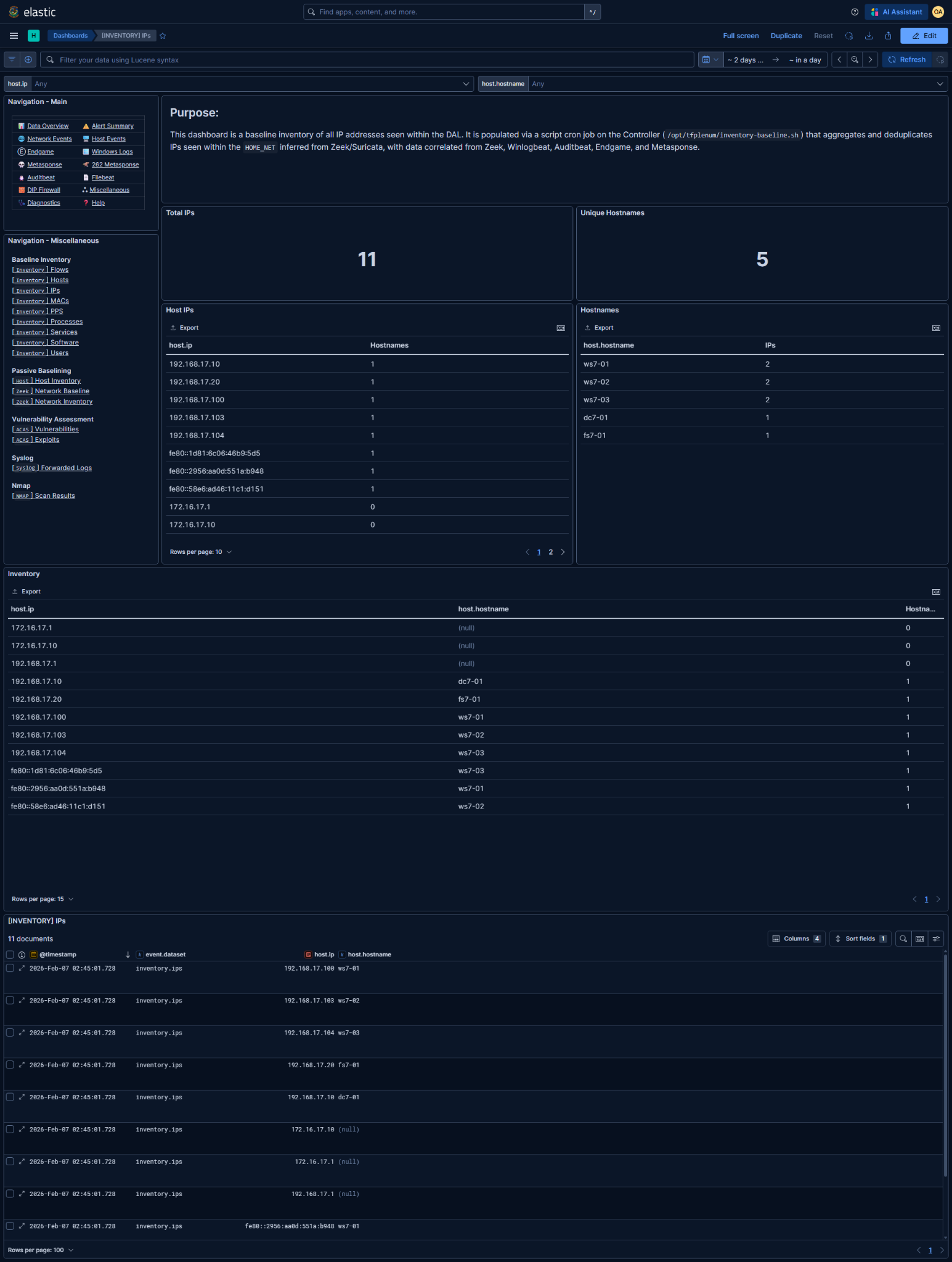
Kibana Dashboard: [INVENTORY] IPs
What is this baseline?
The associated Kibana dashboard represents the baseline inventory of IP addresses observed within the DAL.
- An IP entry consists of:
host.ip- Zero or more associated
host.hostnamevalues (when resolvable)
- Each row answers:
"Was this IP address observed in the baseline inventory?"
- This is not an IPAM or DHCP lease tracker:
- No lease timing or expiration awareness
- No distinction between static vs dynamic addressing
- No guarantee the IP is currently assigned
- A single corroborated observation is sufficient to add an IP to the baseline.
- Entries are deduplicated by hostname
- IPs are added when observed in telemetry correlated to the DAL
- IPs may or may not have an associated hostname
@timestampreflects when the IP was last observed and written into the baseline
Data Prerequisites
If any of these are missing or incorrect, the baseline is unreliable.
1. DAL / HOME_NET must be correct
- Derived from Zeek and/or Suricata
HOME_NET - Used to scope which IPs are considered internal and eligible
- Incorrect DAL → missing internal IPs or inclusion of irrelevant ranges
2. Required telemetry sources (at least one)
- Zeek (
conn,dns,dhcp,ntlm) - Sysmon (network events)
- Auditbeat (
socket) - Endgame (network telemetry)
- Metasponse (any collector)
NOTE: IP discovery is telemetry-driven.
Gaps in network or host telemetry will directly reduce IP coverage.
Basic Analysis Workflow
1. Baseline sanity check
Start by validating expected IP population:
- IP count aligns with known subnet size and mission scale
- IPv4/IPv6 presence matches environment expectations
- No obviously out-of-scope or foreign address ranges
Unexpected absences usually indicate missing telemetry, not evasion.
2. Long-tail analysis (primary value)
Focus on unaccounted or low-context IPs
- IPs with no hostname association
- IPs that appear in multiple datasets with minimal context
Key questions
- DHCP-assigned workstation?
- Infrastructure component (appliance, hypervisor, sensor)?
- Scanning or ephemeral system?
- Rogue or unauthorized device?
Validate against:
- Network diagrams
- Addressing plans
- DHCP scopes
- Administrator confirmation if required
3. Hostname correlation review
IPs with multiple hostnames
- Normal during reimaging or renaming
- Suspicious if simultaneous or across trust boundaries
IPs with no hostname
- Common for:
- Network devices
- Sensors
- Short-lived systems
- Worth scrutiny if:
- The IP participates in unusual flows
- The IP appears inbound-facing
Lack of a hostname is context loss, not evidence.
4. Export for reporting and diffing
Reporting and documentation requirements are determined by the Mission Element Lead/Crew Lead
Common exports
- Full Inventory table (CSV)
- IP ↔ hostname mapping
- IPv6-only address list (if applicable)
NOTE: These exports represent the declared IP baseline for the mission period.
5. Enable baseline deviation detection rule
Enabling too early guarantees noise - it will alert on ALL new inventory additions after enablement.
Detection rules can be managed in Kibana under Security → Rules
[262][Inventory] New IP added to baseline
- Detection logic:
Alert when a new IP address within the DAL is added to the baseline inventory
- Only enable after:
- Baseline window is complete
- Expected subnets are fully populated
- Long-tail IP review is finished
- Ongoing alert tuning:
- Whitelist expected late-appearing IPs
- Suppress known ephemeral or scanning systems
- Validate whether the IP represents a new host or reuse of an existing address
This rule is intended to catch:
- Rogue devices
- Unauthorized subnet expansion
NOTE: This rule may be noisy and useless for DHCP dominant subnets